Text in reminders.
Consent comes first.
YidCalendar is a Jewish calendar and personal agenda app developed and operated by Yosef Ziegler. SMS lets you verify your own phone number, receive replies to reminders you text to the app, and receive only additional reminders you choose to enable.
The dedicated YidCalendar number, (855) 419-9789, is awaiting SMS verification approval. This page documents the app’s consent process; it is not a phone-number signup form and does not send messages. Availability depends on your app build, number verification and carrier delivery.
How you opt in
- In a supported YidCalendar app build, open Settings → Text Reminders and choose Add your number.
- Enter your own phone number. Read the consent disclosure shown before Send code. Nothing is sent just by opening the screen.
- Tap Send code to request a verification text and agree to the disclosed message types.
- Enter the received code in the app to verify that you control the number. Turn on Text in reminders to allow your texts to become Agenda reminders.
- Text a reminder to the number displayed in your app—for example, “Call the shul Sunday 3pm.” Receive a confirmation of what was added. Reply UNDO within 24 hours to remove the most recent texted reminder.
The consent disclosure
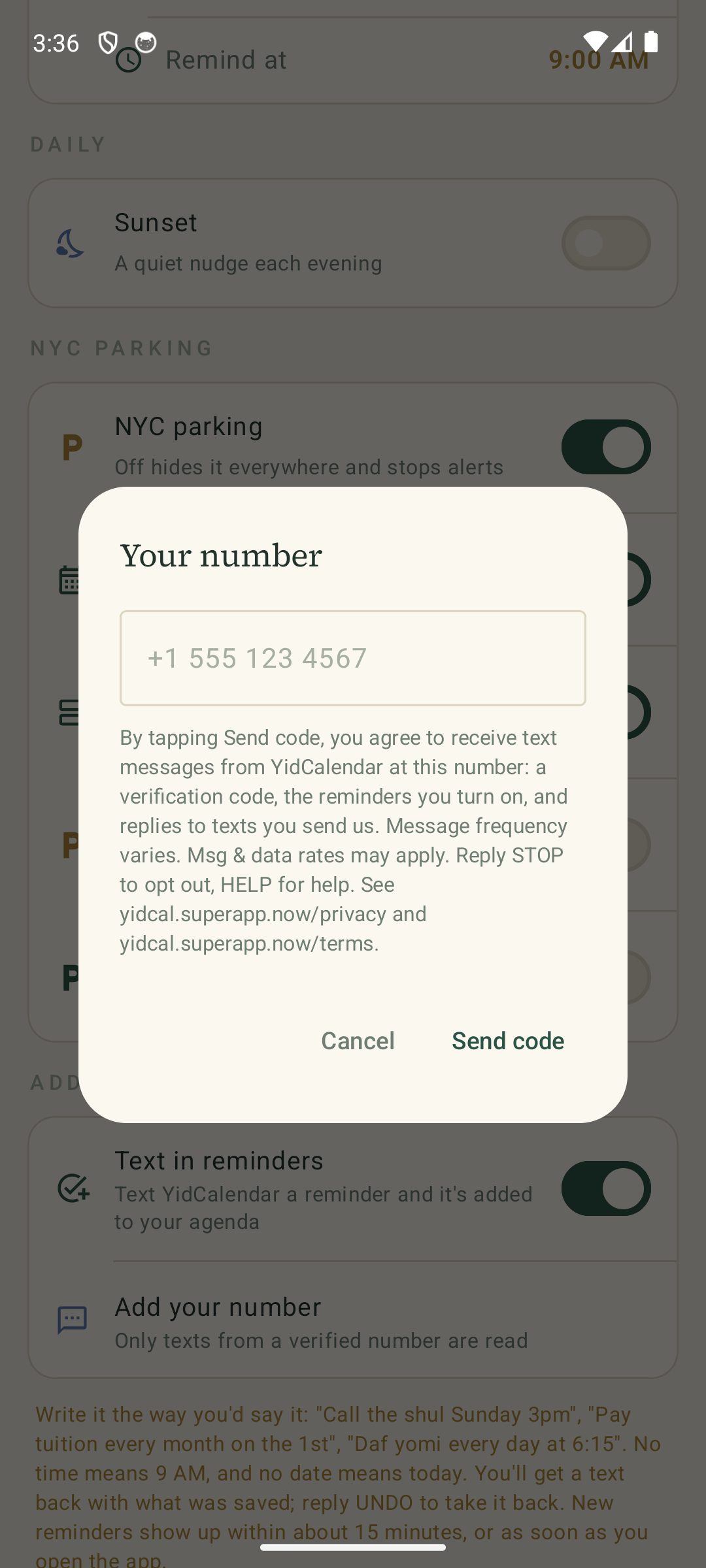
The Android app shows the following before the user taps Send code:
By tapping Send code, you agree to receive text messages from YidCalendar at this number: a verification code, the reminders you turn on, and replies to texts you send us. Message frequency varies. Msg & data rates may apply. Reply STOP to opt out, HELP for help. See yidcalendar.com/privacy/ and yidcalendar.com/terms/.
Existing builds link to our earlier policy pages. This website describes the same service. The iOS Text in reminders setup discloses a verification code and replies to texted reminders, with no other messages unless you enable them.
Schedule a personal SMS reminder
Verify your own cellphone number in Settings → Text Reminders. Type or dictate a request such as “Text me tomorrow at 3 PM to call Moshe,” review the date and time, and confirm and save it. You can also enable Text me (SMS) while creating or editing a reminder. The saved item remains a reminder in YidCalendar; the text is an additional alert.
Wait for the app to confirm that the text has been scheduled. Its backend sends the scheduled message even while the app is closed. Changes, completion, deletion and SMS opt-out update or cancel pending texts after a successful sync. This release supports one-time personal reminders, up to 200 upcoming alerts and dates within five years. Shared-calendar and repeating reminders do not schedule SMS.
What messages you receive
- Verification: a one-time code when you request it.
- Texted reminder replies: confirmation, clarification, errors or undo acknowledgement in response to a text you send.
- Optional reminders: only the calendar or personal reminder messages you turn on in a supported build.
Messages are transactional, not marketing. There are no promotional campaigns or purchased contact lists. Message frequency varies with your requests and enabled reminders. Message and data rates may apply. SMS consent is not a condition of purchasing the app or Premium.
Examples
Your YidCalendar verification code is 123456. Reply STOP to opt out.
YidCalendar added: Call the shul, Sun Oct 4 at 3:00 PM. Reply UNDO to remove.
These are examples only. Codes, reminder titles and dates depend on your request. Do not send sensitive information you do not want processed by an SMS provider.
Stop messages or get help
Reply STOP to opt out. Reply HELP for help, or email yidcalendar613@gmail.com. You can turn off Text in reminders or remove your number in the app. Turning it off on the phone does not replace a carrier STOP request for blocking messages. Re-enrollment requires a fresh opt-in.
Processing and delivery
Twilio delivers SMS. Supabase stores the number verification and reminder-routing records. Texts you send to create reminders are processed by the service, including OpenAI for interpreting supported natural-language requests. The resulting reminder reaches your app when it refreshes; immediate delivery to a closed app is not guaranteed. If you verify the same phone number on another installation, incoming texted reminders route to the installation that most recently verified it.
Mobile carriers may delay or block SMS. This service is not for emergencies. Read our Privacy Policy and Terms.
Updated October 11, 2026.